Table of Contents
- Optimizing PNG Files for Custom Picture Framing
- PNG Basics for Picture Frame Designs
- In-Depth Preparation of PNG Files for Framing
- Practical Tips for Using PNG in Custom Framing
- Advanced Techniques for PNG in Print Media
- Frequently Asked Questions on Picture Frame PNG
- Elevate Your Artwork with Professional PNG Framing
Optimizing PNG Files for Custom Picture Framing
PNG files excel in custom picture framing projects due to their lossless compression and support for transparency. This makes them ideal for a picture frame png design, where elements like overlays preserve sharp details without quality loss. At Supreme Pictures, we recommend PNG for its ability to handle alpha channels, enabling seamless layering in vintage or photo frames. For instance, transparent borders in a picture frame PNG template allow creative effects while maintaining print fidelity.
Related service: professional custom picture framing in Mississauga — serving Mississauga, Brampton and the GTA.
Learn more about our custom framing and printing services in Mississauga at Supreme Pictures, or request a free quote.
To optimize your PNG files, start by reducing color depth to 8-bit if the image suits indexed colors, as outlined in the World Wide Web Consortium’s PNG specification. This step minimizes file size without compromising visuals. Next, remove unnecessary metadata using tools like PNGGauntlet to streamline the file further. Ensure resolution reaches at least 300 DPI to meet Canadian print standards for high-quality framing. We handle these optimizations in our Mississauga workshop to ensure compatibility with our materials.
For transparency handling, preserve the alpha channel during edits to support layering in photo frame PNG designs. In vintage picture frame PNG applications, this creates retro styling effects, such as faded overlays on memorabilia. Flatten layers only after optimization to avoid quality loss. Upload your optimized files to our custom picture framing services online; keep sizes under 50MB for smooth processing, as per our shop guidelines.
Finally, avoid common pitfalls like oversized files that cause upload failures or low-resolution images that blur in prints. Test a sample print before final framing to verify results. With over two decades in business, we at Supreme Pictures guide you through this process for lasting memories—upload today and preview your framed artwork.
PNG Basics for Picture Frame Designs
Building on image basics, let’s dive into PNG specifics for frame designs. The PNG image format stands out as a versatile raster format that supports alpha transparency and lossless compression, making it essential for high-quality picture frame png applications. According to the World Wide Web Consortium’s authoritative international standard, PNG preserves every detail without degradation, ideal for artwork intended for custom framing. This format excels in maintaining sharp edges and vibrant colors, ensuring your designs translate seamlessly to prints. For instance, when creating picture frame png files for transparent overlays, you avoid the pixelation issues common in other formats. Comprehensive technical documentation from the Mozilla Developer Network highlights PNG’s preference for precise reproduction, particularly in scenarios requiring transparency like layering elements in frame compositions.
PNG’s technical features make it a top choice for picture frame designs. It offers 24-bit RGB color support alongside an alpha channel, allowing for seamless backgrounds that blend perfectly with frame aesthetics. Lossless compression ensures no quality loss during repeated edits, a key advantage for intricate vector-based overlays on photos, such as integrating a photo frame png element into family portraits. The file structure, as detailed in the PNG specification, includes chunks for metadata like color profiles, preventing degradation even in complex edits. This benefits designs like vintage picture frame png applications, where retro patterns require faithful color fidelity and sharp transparency masks. You can achieve professional results by using PNG files for picture frames, supporting up to 48-bit color depth for nuances in artwork.
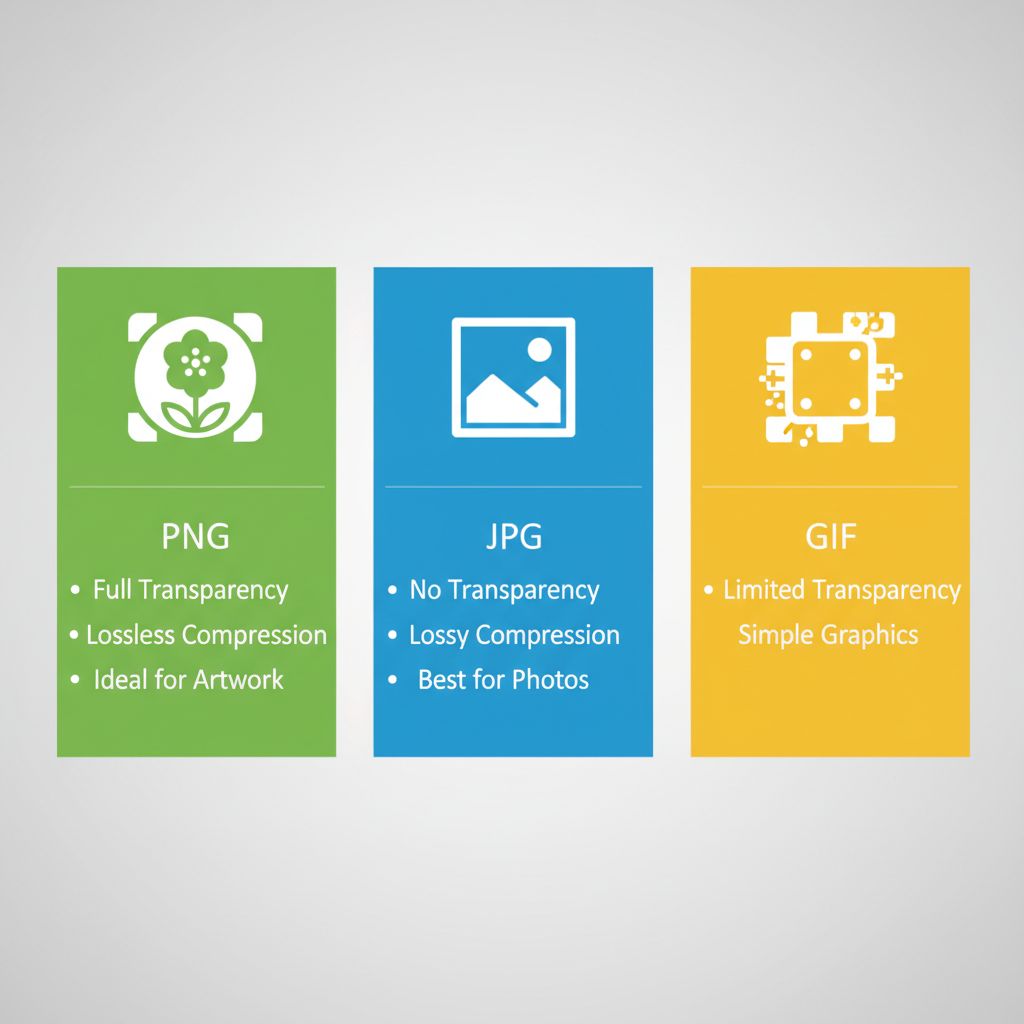
Comparison of PNG, JPG, and GIF formats for picture frame designs
This infographic visually reinforces PNG’s strengths, showing how its features align with framing needs. Moving to comparisons helps clarify format selection for your projects.
PNG excels for framing due to its print-ready sharpness and color fidelity, as academic library expertise from the University of Michigan Library recommends 300 DPI resolutions for high-quality outputs. Unlike lossy alternatives, PNG maintains integrity from digital design to physical frame, ensuring transparent photo frame PNGs integrate without artifacts.
The following table compares key image formats for custom framing:
| Format | Transparency Support | Compression Type | Best Use in Framing | File Size Impact |
|---|---|---|---|---|
| PNG | Yes, alpha channel | Lossless | Ideal for artwork with backgrounds | Moderate |
| JPG | No | Lossy | Photos without transparency | Small |
| GIF | Limited (1-bit) | Lossless, but limited colors | Simple graphics | Small |
At Supreme Pictures, we handle PNG uploads with precision, checking resolutions at 300 DPI to match our custom frame templates. Our two decades of experience ensure compatibility, from uploading your picture frame png to previewing overlays in our online system. We process files for seamless integration, supporting transparent elements in canvas and metal prints. This streamlined approach, backed by our in-house workshop, delivers professional results without quality loss, allowing you to relive memories through crafted frames.
In-Depth Preparation of PNG Files for Framing
Building on general file preparation basics, this section dives deeper into optimizing PNG files specifically for custom framing at Supreme Pictures in Mississauga. With over two decades of experience crafting high-quality prints, we guide you through resolution standards and transparency techniques to ensure your picture frame PNG files yield stunning results. Proper preparation prevents common issues and guarantees seamless integration into frames.
Resolution Requirements for Picture Frame PNG
Achieving sharp prints starts with understanding resolution needs for your picture frame PNG. For custom framing services in Mississauga, we recommend a minimum of 300 DPI to capture fine details without pixelation. Consult an image resolution guide for further pixel calculations specific to your frame size, as advised by the University of Michigan Library’s academic resources on print media benchmarks.
For an 8×10 inch frame, set your PNG to 300 DPI, resulting in 2400×3000 pixels for crisp photo details. This standard ensures vibrant colours and clear lines, ideal for portraits or artwork submitted to our Mississauga studio. Larger sizes demand even higher pixel counts to maintain quality during the framing process. According to Supreme Pictures’ internal expertise, we handle standard submissions effortlessly, upscaling where needed to meet these requirements.
The following table compares key resolutions for various frame sizes to guide your picture frame PNG preparation:
| Frame Size | Recommended DPI | Pixel Dimensions (PNG) | Quality Outcome | Supreme Pictures Recommendation |
|---|---|---|---|---|
| 8×10 inches | 300 DPI | 2400×3000 | Sharp detail | Yes |
| 16×20 inches | 300 DPI | 4800×6000 | High clarity for larger art | Yes |
| 24×36 inches | 150-300 DPI | 3600×5400 | Balanced for posters | Adjust per need |
For local Mississauga printing at Supreme Pictures, upscale low-resolution PNGs to 300 DPI using bicubic interpolation. This technique preserves edges and reduces artifacts, ensuring professional results without quality loss, as per our two decades of in-house expertise in custom framing.
File Optimization Techniques for Transparency
Transparency in PNG files enhances seamless integration within frames, especially for photo frame PNG designs. Preserve alpha channels to avoid unwanted backgrounds, allowing your artwork to blend naturally with mats or canvases at Supreme Pictures in Mississauga.
Follow these steps using tools like Adobe Photoshop:
- Open your PNG and select the layer with transparency.
- Use the Magic Wand tool to remove backgrounds: Click on the area to select, then press Delete while ensuring the layer has transparency enabled.
- Save as PNG: Go to File > Save As, choose PNG format, and check ‘Transparency’ in the options dialog to maintain alpha channels.
This process, drawn from Kansas City Art Institute’s guidance on digital artwork formatting, ensures clean edges for framing-ready PNG images. For example, a photo frame PNG with isolated subjects prints flawlessly on our large-format equipment. Test transparency by previewing in our online tool—upload, choose media, and select moulding to visualize the final frame.
Common Pitfalls in PNG Preparation
Preparing PNG files for framing can lead to errors that affect print quality, but Supreme Pictures in Mississauga offers solutions. Common mistakes include using RGB colour modes instead of CMYK for print-ready outputs, causing colour shifts in final frames.
Other pitfalls:
- Incorrect resolution: Submitting low-DPI files results in blurry prints; always verify pixel dimensions match frame size.
- Ignoring file size limits: Oversized PNGs slow uploads—compress without losing quality using tools like Photoshop‘s Save for Web.
- Background artefacts in vintage picture frame PNG contexts: Historical art often retains scan noise; clean with the Clone Stamp tool to prevent distractions.
According to University of Michigan Library benchmarks, mismatched colour modes are frequent, but our internal expertise at Supreme Pictures provides free corrections via the online portal. Upload your file, and our team reviews for issues like these, ensuring optimal results. With two decades serving the Greater Toronto Area, we guide corrections to relive your memories perfectly.
Practical Tips for Using PNG in Custom Framing
Building on PNG fundamentals, here are practical tips for incorporating picture frame png files into your custom framing projects with Supreme Pictures. The transparency feature of PNGs allows seamless integration with personal photos, enhancing visual appeal without visible edges. We have over two decades of experience helping clients in the Greater Toronto Area achieve stunning results through our online platform.
Sourcing Transparent Picture Frame PNG Templates
Finding high-quality transparent picture frame png templates is straightforward with free resources available online. Start by visiting FreeSVG.org, where you can download vector clip art like the “Gloss transparent black frame vector” under Public Domain license, as offered by FreeSVG.org. This site provides PNG formats in various sizes, such as 2400px for high-resolution needs, ensuring compatibility for your designs.
To adapt these for Supreme Pictures submissions:
- Open the PNG in software like Adobe Photoshop or free alternatives such as GIMP.
- Resize to match your photo dimensions, typically aiming for 300 DPI as per our internal service specifications from Supreme Pictures.
- Check licenses to confirm commercial use is allowed, avoiding any restrictions for personal framing projects.
Applying PNG to Canvas and Metal Prints
Once sourced, apply your picture frame png to alternative media like canvas and metal prints for versatile displays. At Supreme Pictures, we support PNG compatibility across these options through our online platform, serving clients in the Greater Toronto Area with convenient pickup in Mississauga.
- Ensure your PNG is at the required resolution: 300 DPI for metal prints or 150-300 DPI for canvas, flattening layers to avoid transparency issues during processing.
- Check compatibility; for metal prints, PNGs work well with dye-sublimation techniques, preserving transparency on the surface.
- Upload via our drag-and-drop interface at Supreme Pictures. Select canvas or metal as the medium, crop your image, and preview in a virtual room setting.
- Choose options like wrap-around for canvas to adapt PNG edges seamlessly, or high-gloss finish for metal. Add to cart and opt for GTA pickup to save on delivery.
- Review the total; our system alerts if the file is too small, ensuring quality prints.
Explore our canvas prints services for seamless integration of your designs. This process, guided by internal guidelines from Supreme Pictures, typically takes 2-5 days for canvas and 3-7 days for metal, allowing quick turnaround for your projects in the Greater Toronto Area.
| Medium | PNG Transparency Support | Resolution Needs | Processing Time | Best for Toronto Clients |
|---|---|---|---|---|
| Traditional Framing | Full support | 300 DPI | 1-3 days | Yes, with matting |
| Canvas Prints | Adapted for wrap-around | 150-300 DPI | 2-5 days | Seamless edges |
| Metal Prints | Yes | 300 DPI | 3-7 days | High-gloss finish |
Integrating Vintage Styles with Photo Frame PNG
Integrate vintage styles using photo frame png overlays to add timeless elegance to your custom frames at Supreme Pictures. For example, layer an ornate photo frame png around a family portrait to evoke classic appeal, blending historical motifs with modern photos.
Advanced Techniques for PNG in Print Media
Building on foundational knowledge, advanced techniques elevate PNG files for professional print media, particularly in custom framing workflows. At Supreme Pictures, with over two decades of experience serving the Greater Toronto Area, we recommend leveraging PNG’s transparency and lossless compression for seamless overlays in framing designs. For instance, the picture frame png format excels in maintaining sharp edges without artefacts, essential for high-quality prints requiring at least 300 DPI resolution as per educational best practices from the Kansas City Art Institute. This ensures crisp results when preparing artwork for our in-house workshop in Mississauga.
Layer-based editing preserves alpha channels in PNG files, allowing precise masking for irregular shapes like mat board cutouts. Understanding web image formats helps in selecting PNG for its superior transparency in print workflows, unlike lossy options such as JPEG, according to authoritative documentation from the Mozilla Developer Network.
| Tool | Transparency Editing | Batch Processing | Integration | Cost |
|---|---|---|---|---|
| Adobe Photoshop | Advanced layers | Yes | Direct export | Subscription |
| GIMP | Full support | Yes | Free alternative | Free |
| Affinity Photo | One-time purchase | Limited | Compatible | $70 |
Frequently Asked Questions on Picture Frame PNG
Building on frame design basics, here are answers to common questions about picture frame png images.
What is a picture frame PNG and why use it?
A picture frame png is a digital image file with a transparent background, ideal for overlaying on photos in design software. We recommend it for creating customizable framing effects without visible edges.
What are the benefits of PNG format for photo frames?
The PNG format offers transparency and lossless compression, preserving high-quality details in frame graphics, as per the World Wide Web Consortium (W3C) recommendation.
Elevate Your Artwork with Professional PNG Framing
Building on your creative designs, elevate your digital artwork using a picture frame png that leverages transparency for seamless integration without background interference.
Explore custom photo prints at Supreme Pictures to achieve a polished finish. Ready to bring your framed artwork to life through printing?
This article was researched and written with the assistance of AI tools.
Resources
- Create Custom Photo Prints with Framing Options Online
- Get Custom Picture Framing and Printing in Mississauga GTA
- Upload Images for Custom Canvas and Metal Prints
- Upload Digital Images for Photo Prints and Framing
- Frame Sports Jerseys with UV-Protected Custom Displays
- Order Custom Mirror Glass with Beveled Edges Locally
- Access Same-Day Photo Printing and Passport Services
- Learn PNG Format for Lossless Image Compression
- Choose Optimal Web Image Formats for Compatibility
- Resize Images in GIMP for Print and Web
- Download Free Gloss Black Frame Vector Clip Art
- Format Digital Artwork for High-Quality Printing Guide